Debris Orbit and Imaging
First clone core and demos through Shared Preparation. Run commands from the PyLoN core root.
Estimate relative motion to nearby debris using 3D LiDAR and IMU, orbit it with RCS, and capture onboard images. A .craft from actual orbit testing is included for loading in the VAB.
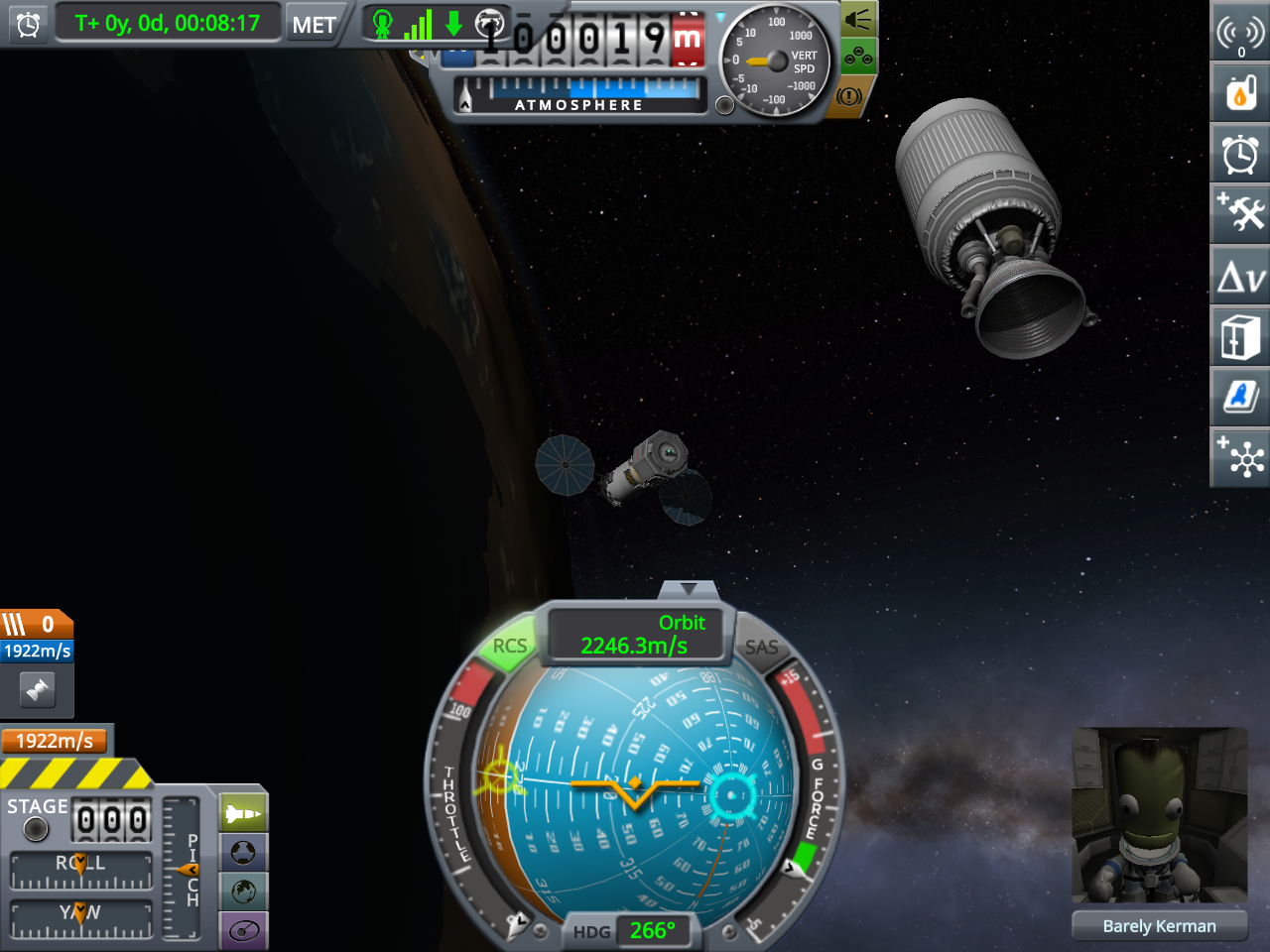
The vessel with deployed solar panels at bottom center is the observer; the tank and engine at upper right are the target. Images on this page record a KSP 1.12.5 run on 2026-09-07.
1. Prepare the Python demo environment
After installing the mod and bridge through Getting Started, run from the PyLoN repository root.
source /opt/ros/jazzy/setup.bash
sudo apt install python3-numpy python3-scipy python3-yaml \
  ros-jazzy-sensor-msgs-py ros-jazzy-tf2-ros-py ros-jazzy-nav-msgs \
  ros-jazzy-visualization-msgs
rosdep install --from-paths \
  Ros2/pylon_interfaces Ros2/pylon_bridge Ros2/pylon_vehicle_control \
  --ignore-src --rosdistro jazzy -y
./sync.sh --skip-ksp-build --skip-ksp-sync --demo debris_orbit
source ~/ros2_ws/install/setup.bashThis demo runs from Python source without ament_python. Sync builds core ROS packages and copies demo sources. The demo itself needs neither colcon build nor pip install.
2. Load the included vessel in KSP
The vessel is pylon_demo_debris_orbit/craft/PyLoN Debris Orbiter.craft in the demos repository. It preserves part placement and sensor settings from test vessel test A, converting old mod identifiers to current PyLoN names. Stock KSP parts and PyLoN are required.
Exit KSP, then run below from the PyLoN core root. Replace SAVE with an existing Sandbox save directory. Existing files with the same name are not overwritten.
KSPDIR="$HOME/.local/share/Steam/steamapps/common/Kerbal Space Program"
SAVE='ROS2 debug'
cp -n '../demos/pylon_demo_debris_orbit/craft/PyLoN Debris Orbiter.craft' \
"$KSPDIR/saves/$SAVE/Ships/VAB/"Open that save in KSP and select PyLoN Debris Orbiter in VAB vessel loading. Put one crew member in the Mk1 Lander Can.
| Included equipment | Settings / purpose |
|---|---|
| Eight RCS blocks and monopropellant tank | Translation and attitude control during orbit |
| Two solar panels | Deploy in orbit for power |
| 3D LiDAR | Sensor ID front_lidar、Long、250 m、10 Hz |
| RGB camera | Sensor ID orbit_camera, 5 Hz, 60° vertical FOV |
| X200-32 tank + Mainsail beyond the decoupler | Separate as the imaging target |
Save the pre-separation state
The .craft contains the vessel design, not orbital position/velocity or separation state. The included vessel is for orbital tests and has not been validated as a ground-launch rocket.
- With automated control demos stopped, enter Flight from the VAB. Use KSP's stock debug-menu
Set Orbitto place it in a roughly 100 km circular Kerbin orbit. Check that both periapsis and apoapsis are about 100 km. For a normal launch, prepare a separate launch vehicle. - Return to 1× time, set throttle to zero, and shut down Mainsail through its right-click menu. Confirm the separated target will remain unpowered.
- Deploy observer solar panels and check sunlight, Electric Charge, and MonoPropellant. Stabilize rotation with SAS attitude hold or similar, then release manual controls.
- Create a named KSP save
PyLoN Orbit - before separationfor retrying separation. Keep it distinct from normal quicksave and do not overwrite it during trials.
Separate and manually stabilize relative motion
- Separate the tank/engine through the decoupler right-click menu. Do not press Space; saved stages also include the engine.
- Control the Mk1 Lander Can side carrying sensors. Select the separated object as target and switch navball velocity to
Target(relative velocity). The several km/s shown inOrbitis not relative velocity between observer and target. - Enable observer RCS and reduce closing/receding speed with short translation pulses. Check relative speed after each pulse without holding controls. Pointing the nose at the target alone does not brake.
- As a starting guideline, adjust center distance to 20–40 m and relative speed to 0.25 m/s or less. Visually check surface clearance and move away first if contact is likely. These are preparation targets, not guaranteed operating limits or automatic start criteria.
- Point LiDAR and camera toward the target and confirm sensors and UDP are enabled. Sensor IDs are preset in the included craft. SAS may hold attitude during preparation.
This demo assumes observer and an unpowered target are in nearby shared free fall. Default orbit radius is 15 m. The LiDAR center is the center of the visible surface and may differ from KSP target distance. Leave collision clearance throughout the orbit for the vessel and debris dimensions.
Orbit/imaging records exist for the original vessel, but reloading/reflying the renamed PyLoN craft and reproducing the initial-state procedure here remain unvalidated. No orbital/separated save is distributed. Save and reuse a state in your environment after passing the observation checks below.
3. Start the bridge
Run in terminal A using this single bridge process. For Space ROS, replace the host bridge below with ./spaceros.sh run --disable-ground-truth and follow host integration. Demo and inspection CLI commands here run in host Jazzy.
source /opt/ros/jazzy/setup.bash
source ~/ros2_ws/install/setup.bash
ros2 run pylon_bridge udp_bridge \
--host 127.0.0.1 --port 49010 --disable-ground-truthCheck inputs in another terminal.
source /opt/ros/jazzy/setup.bash
source ~/ros2_ws/install/setup.bash
ros2 topic echo --once --qos-reliability best_effort /ksp_vessel/lifecycle
ros2 topic hz /ksp_vessel/lidar_3d/front_lidar/points
ros2 topic hz /ksp_vessel/imu/data_raw
ros2 topic hz /ksp_vessel/camera/orbit_camera/image_rawRun ros2 topic hz one at a time and stop with Ctrl-C after checking. Continue only once lifecycle is ACTIVE and point clouds, IMU, and images arrive.
Check startup conditions with control disabled
Start estimation and visualization only in terminal B. In addition to --no-enabled, specify --no-controller so the control node is not started.
source /opt/ros/jazzy/setup.bash
source ~/ros2_ws/install/setup.bash
python3 ../demos/pylon_demo_debris_orbit/run.py \
  --no-enabled --no-controller --instance orbit_a \
  --lidar-sensor-id front_lidar --camera-sensor-id orbit_camera \
--orbit-radius 15.0 --rvizInspect the following topics in another sourced terminal. Stop each echo with Ctrl+C.
ros2 topic echo /ksp_vessel/demos/debris_orbit/orbit_a/estimator_status
ros2 topic echo /ksp_vessel/imu/data_raw --field angular_velocityThese are manual check guidelines for a repeatable starting state, not automatic code checks or real-flight-validated performance values. With 1× time and unpaused, release manual controls and observe for about ten seconds.
| Check | Guideline before saving |
|---|---|
| Estimator | Continuous state: tracking with increasing observations; RViz target cluster matches the separated object |
| Target range | range_m roughly 20–40 m, with visible collision clearance |
| Relative speed | relative_speed_mps at most 0.25 without sudden increases |
| Observer angular rate | IMU angular_velocity magnitude √(x²+y²+z²) at most 0.035 rad/s (about 2°/s) |
| Inputs / resources | Continuous point clouds, IMU, images; charge and propellant remain; target is not firing |
If tracking does not appear, check LiDAR direction, range, and obstruction. This inspection mode does not rotate automatically to search. If relative speed remains high, the target spins rapidly, or separation keeps increasing, do not start automatic control; adjust manually or reload the pre-separation save.
Save the post-separation initial state
Once conditions pass, stop estimation/visualization with Ctrl+C, pause KSP, and create the named save PyLoN Orbit - ready, separate from the pre-separation save. Saving only the .craft cannot restore this state.
Record KSP/PyLoN/demos versions or commits, periapsis/apoapsis, target, distance/relative speed/angular rate, charge/propellant, Sensor IDs, and orbit radius with the save name. Check source commits with git rev-parse HEAD in each repository.
After saving, unpause, check sensor reception, and start a fresh automatic-control process below. Do not leave the estimation-only process running.
4. Start orbiting
Run in terminal B. --enabled starts vessel control. Enable RCS and avoid manual inputs, vessel switches, or time warp thereafter. Select ROS2 control ON through Flight's ROS button. KSP disables SAS; the demo sends no authority acquisition/renewal/release topics. The bridge fills controller/lease IDs and sequence. Default speed is 6 deg/s (about one minute per orbit).
source /opt/ros/jazzy/setup.bash
source ~/ros2_ws/install/setup.bash
python3 ../demos/pylon_demo_debris_orbit/run.py \
  --enabled --instance orbit_a \
  --lidar-sensor-id front_lidar --camera-sensor-id orbit_camera \
--orbit-radius 15.0 --rvizThe vessel rotates to search until it finds a target. After three consecutive point-cloud detections, it points toward and approaches the target, then orbits after reaching the requested radius. RViz shows the point cloud, target cluster/center, observer, target radius, and trajectory.
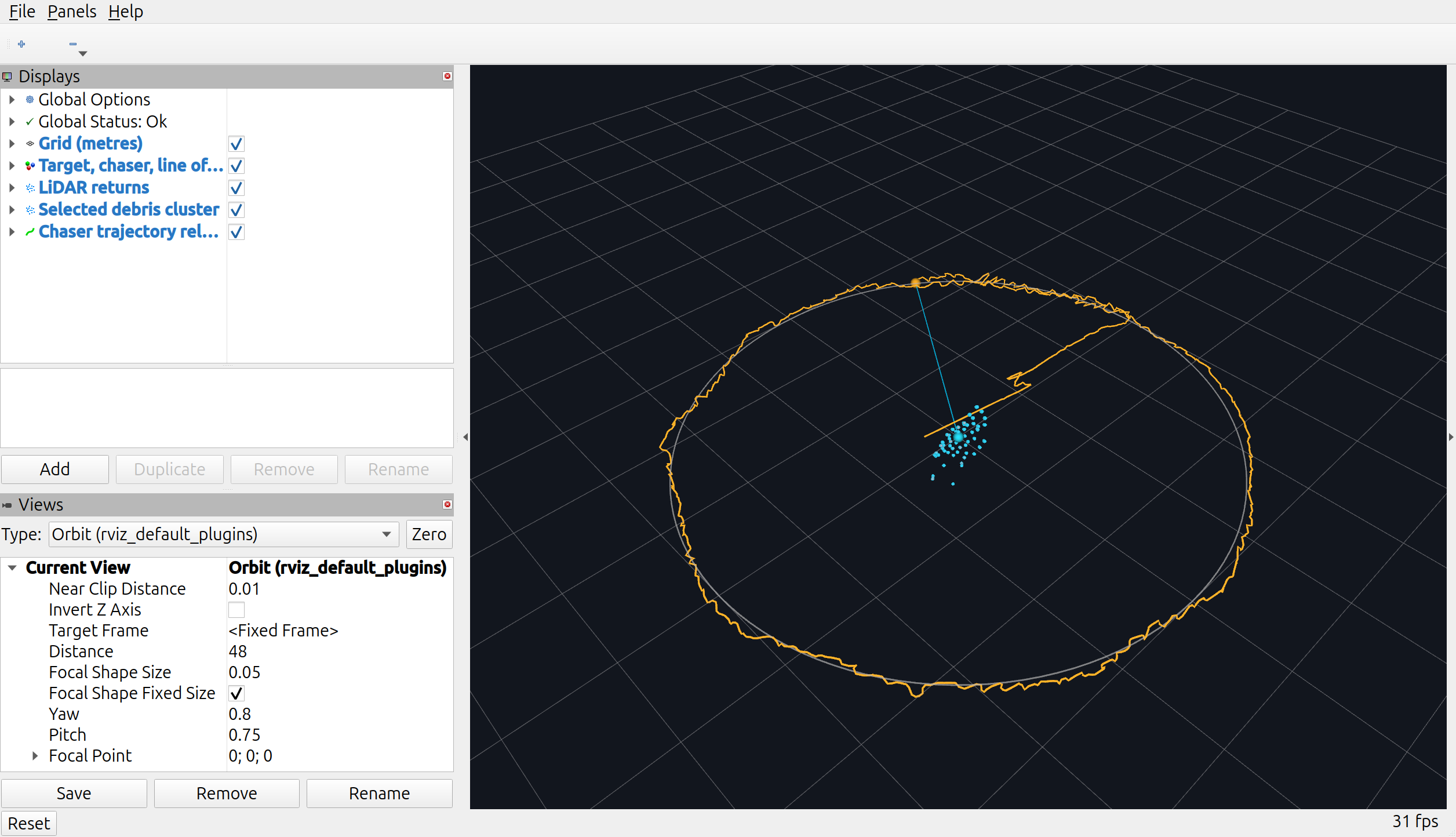
The cyan point cloud is the target, the gray circle is requested radius, and the orange line is the observer's estimated trajectory. Check target acquisition and that the trajectory circles it.
For estimation and visualization only, replace --enabled above with --no-enabled --no-controller.
5. Inspect state and captured images
ros2 topic echo /ksp_vessel/demos/debris_orbit/orbit_a/status
ros2 topic echo /ksp_vessel/demos/debris_orbit/orbit_a/estimator_status
ros2 topic echo /ksp_vessel/demos/debris_orbit/orbit_a/controller_statusIf you change --instance, also replace orbit_a in topic names.
Taking orbit start as 0°, PNG and measurement JSON are saved every 36°. Output is relative to the demo working directory: pylon_demo_debris_orbit_captures/orbit_a/<startup-timestamp>/. Capture continues on subsequent orbits by default.
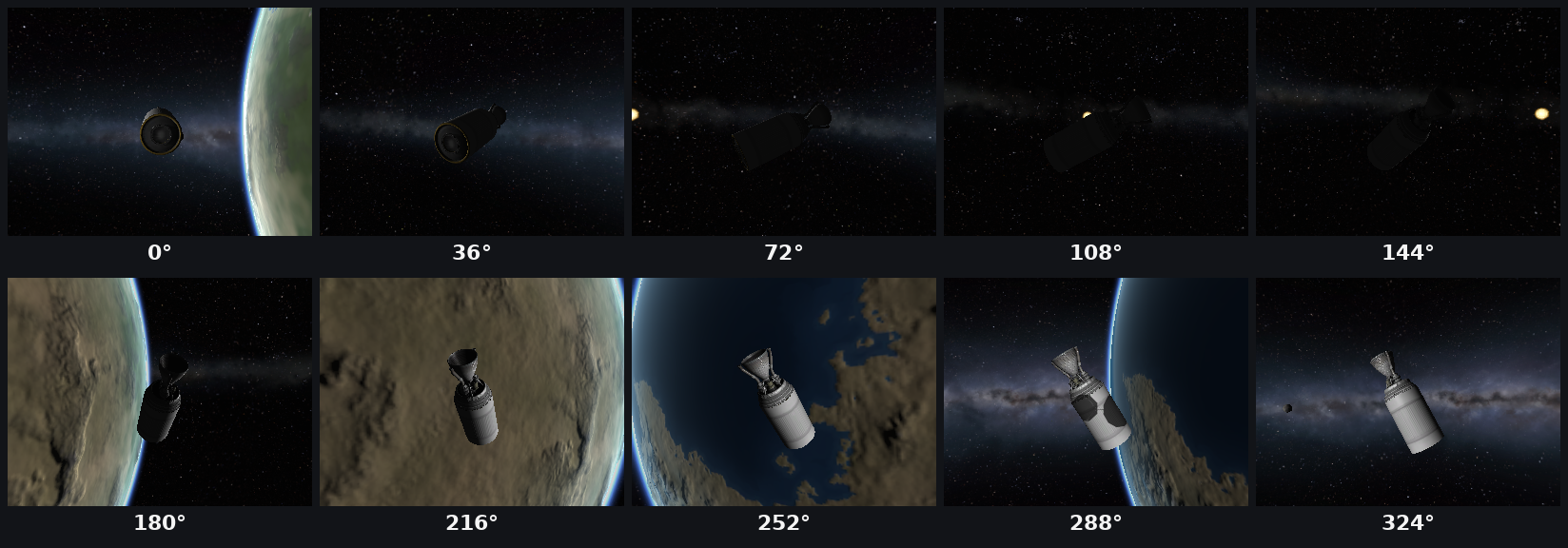
Example onboard captures: top row 0–144°, bottom row 180–324°. Viewing direction and Kerbin background change. This montage arranges saved PNGs for explanation; the demo outputs individual PNG and JSON files.
Image timestamps are matched to estimated angles, saving frames within the requested-angle tolerance, default ±2°. A short history matches image time even when images arrive before navigation updates. For capture_missed, check image rate and latency.
Stopping and resuming
Pressing Ctrl-C in the demo terminal zeros control commands. Select KSP ROS2 control OFF to return to manual control. Stop the bridge afterward with Ctrl-C if desired.
The demo holds stopped state after vessel switches, authority loss, or missing inputs. After an IMU gap above 0.5 seconds, stabilize the vessel and restart the entire demo process.
Retry from a saved initial state
- Stop the entire demo with Ctrl+C, then stop the bridge. Confirm no stopped-demo process remains.
- Load named save
PyLoN Orbit - readyin KSP, orbefore separationto retry from separation. - Confirm observer control and restored target, orbit, sensors, charge, and propellant. Unpause and use 1× time.
- Restart the bridge from step 3 and confirm fresh ACTIVE lifecycle and sensor reception.
- Repeat about ten seconds of startup checks with control disabled, stop that demo, then start step 4's automatic control.
Loading rewinds simulation time. Restart all three nodes to align IMU reference and session rather than keeping previous estimator/controller state. Named saves restore KSP state, not ROS estimates. These steps establish similar initial conditions without guaranteeing identical trajectories.
Main startup arguments
| Argument | Value in this guide | Purpose |
|---|---|---|
--enabled / --no-enabled | --enabled | Start / disable orbit control |
--instance | orbit_a | Identifier for topics and capture directories |
--lidar-sensor-id / --camera-sensor-id | front_lidar / orbit_camera | Mounted sensor IDs |
--orbit-radius | 15.0 | Orbit radius [m] |
--angular-speed-deg-s | 6.0 | Angular speed [deg/s], about 60 seconds per orbit |
--rviz | Specified | Start RViz |
--no-controller | Omit for control | Start estimation/visualization only |
--config | Included source YAML | Change estimation, guidance, and capture settings |
Configuration is at ../demos/pylon_demo_debris_orbit/config/pylon_demo_debris_orbit.yaml. See Vehicle Control API for commands and KSP control ON/OFF, and RGB Camera for image settings.
Python structure and flight validation
Position/attitude recognition is in debris_orbit/recognition.py, target attitude in debris_orbit/attitude.py, and target thrust in debris_orbit/thrust.py. Three nodes normally run in one Python process. See the Demo README.
After the 2026-10-06 update, real flight was validated using KSP ROS2 control ON without authority operation topics. At 15 m radius and requested 6 deg/s, one orbit took about 64 seconds; 28 images were saved through the third orbit, with ten each on the second and third. Maximum capture-angle error was 1.99°. The first orbit missed two capture points due to camera reception intervals; long uninterrupted operation remains unvalidated. A separate test confirmed stopped-state retention after about one second without input reception and no automatic resume after KSP OFF → ON.
With the older 1 deg/s setting on 2026-10-06, Linux KSP 1.12.5, ROS 2 Jazzy, and PyLoN completed one orbit and second-orbit captures from a validation copy of a separated orbital save. With front_lidar / front_camera, radius 15 m, and 1 deg/s, estimation reached 508° with 15 captures every 36°, maximum angle error 0.82°. After about nine minutes, a roughly one-second sensor gap triggered the missing-data guard, stopped control, and returned authority. Long uninterrupted operation and fresh loading/separation of the included craft remain unvalidated.